Chapter 12. Diagrams
If GraphViz is configured, the
--graph option will save a graphical representation of the
parse forest. This can help identify ambiguities and, generally, help you
understand the shape of the parse.
Consider the following silly grammar:
S = -"It's a ", noun .-noun = animal | sporting-item .animal = "rat" | "cat" | "bat" .sporting-item = "ball" | "glove" | "bat" .
The graph option will show how the two deriviations for “bat” occur:
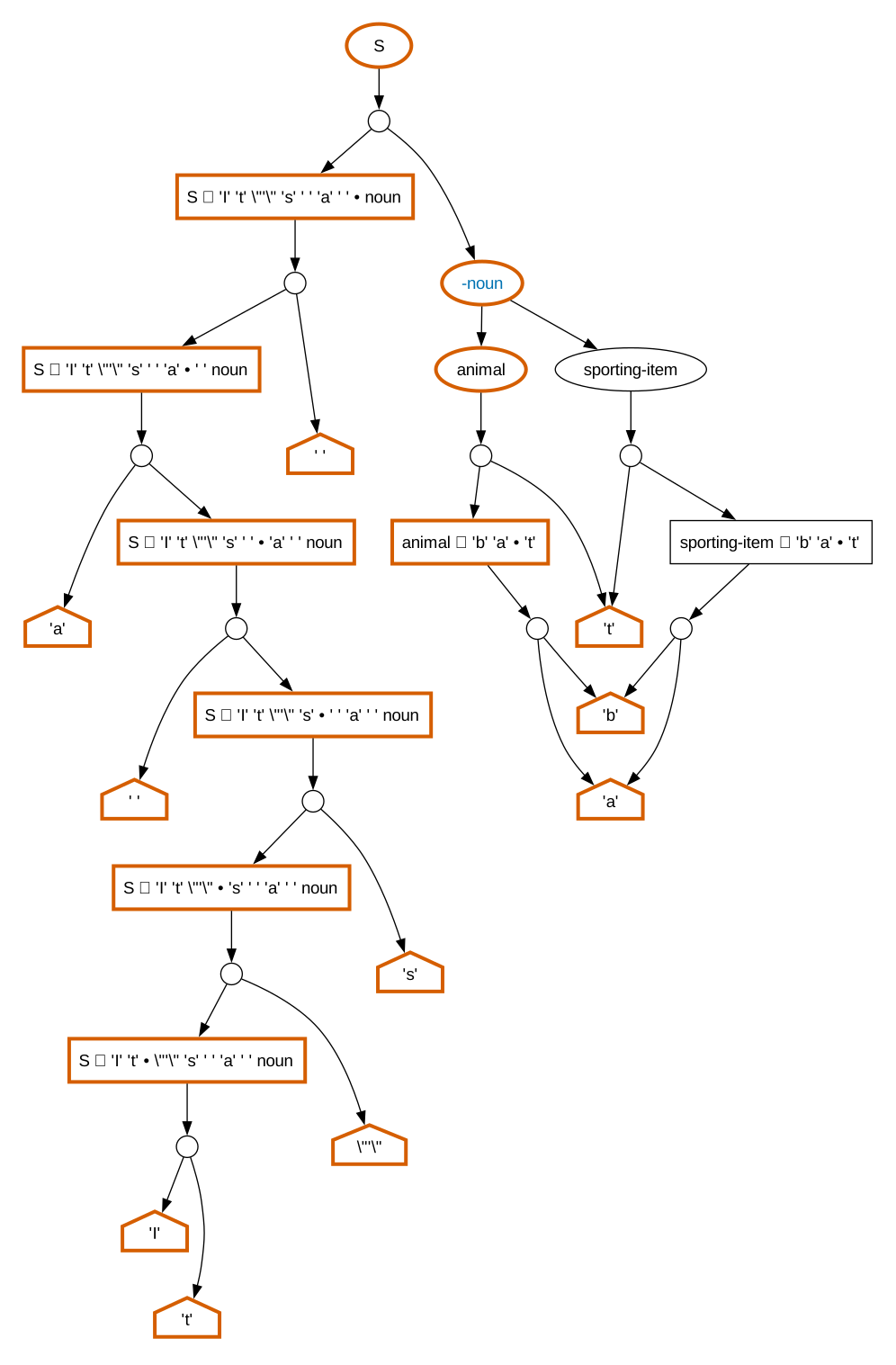
The graph is constructed by creating an XML description of the parse forest and
then transforming into GraphViz dot language with XSLT. The XSLT stylesheet has many
options. These can be set with the --graph-option command line
option or with the graph-options configuration property.
For example, the simplify-terminals option will simplify the graph
by attempting to remove branches that just derive nonterminals. With that option,
the graph above becomes:
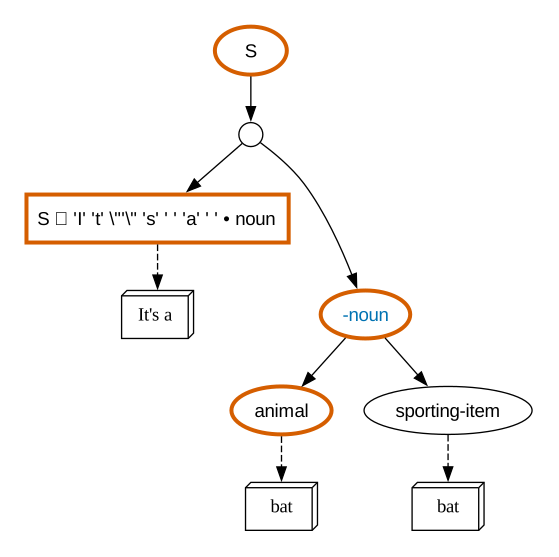
That’s a lot easier to read!
12.1. Options summary
The available options are summarized below. Most of these options set properties for the GraphViz program. Consequently, the legal values depend on what your version of GraphViz supports.
The parenthesized values after each item indicate it’s type and default value. Options that require node IDs are unlikely to be useful to end users because the node IDs are arbitrary and can vary between invocations. But they are how CoffeePot communicates selected nodes to the graphing stylesheet.
alt-edge-color(color;#aaaaaa)-
The color of “alternate edges”, edges that point to nodes that are not present in the graph. For example, if you limit the depth of the graph, all edges that point to “deeper” nodes will be styled as alternate edges.
alt-edge-style(line style;dashed)-
The line style of alternate edges.
ambiguity-font-color(color;#0072b2)-
The text color of amibiguous nodes.
bgcolor(color;none)-
The background color of nodes.
edge-color(color;black-
The color of edges.
edge-pen-width(width;1)-
The width of edges.
edge-style(line style;solid)-
The line style of edges.
insertion-shape(shape;note)-
The node shape used for insertions.
label-color(color;none)-
The graph is divided into clusters; if the label color is not “none”, the label for each cluster will be printed in the specified color. The labels have no meaning; this is really a debugging option.
node-color(color;black)-
The color of nodes.
node-fill-color(color;white)-
The fill color of nodes.
node-font-color(color;black)-
The font color for node labels.
node-font-name(font;Arial)-
The font used for node labels.
node-pen-width(width;1)-
The weight of the pen used to draw nodes.
nonterminal-shape(shape;oval)-
The shape of nonterminal nodes.
priority-color(color;#56b4e9)-
The color of priority labels.
priority-size(font-size;10pt)-
The font size of priority labels.
rankdir(rank;TB)-
The GraphViz ranking direction.
selected-depth(integer or INF;INF)-
The maximum depth of the graph. A value of
INFmeans unlimited. selected-node-color(color;#d55e00)-
The color for nodes used in the serialized parse.
selected-node-fill-color(color;white)-
The fill color for selected nodes.
selected-node-font-color(color;black)-
The font color for selected nodes.
selected-node-font-name(font;Arial)-
The font for selected nodes.
selected-node-pen-width(width;3)-
The weight of the pen used to draw selected nodes.
selected-nodes(list of node IDs)-
A comma-separated list of node IDs. This list is provided automatically by CoffeePot. The selected nodes represent the choices selected by a given parse.
selected-root(node id;())-
If a node ID is specified, the graph drawn will be rooted at that node.
show-priority(boolean;false)-
Show priority values on edges?
show-ranges(boolean;true)-
Show the span of characters matched by nodes.
show-real-root(boolean;true)-
Show the “real” root node, always labeled
$$. If this option is false, the graph will begin at the user’s root node. show-states(boolean;false)-
For an Earley parse, show the state labels for each node.
simplified-shape(shape;box3d)-
The shape used to show where a terminal deriviation has been simplified.
simplify-terminals(boolean;false)-
If true, remove branches from the graph that do nothing but derive terminals.
state-shape(shape;box)-
The shape for “state” nodes.
subgraph-color(color;none)-
The background color for the graph.
terminal-shape(shape;house)-
The shape for terminal nodes.